This feature is already available in our new administration portal. The new portal is currently in beta. Instructions for using the new portal can be found at the end of this article.
Set up Managed Google Play accounts for your Android devices in the Cortado Administration Portal. This allows you to take advantage of all the benefits of Android Enterprise.
Configuring Managed Google Play accounts is simple and quick. This allows you to manage your users' devices and their apps in no time at all.
Register your organization with Google
Configure Google settings to the Administration Portal
Register your organization with Google
- If you want to use the Managed Google Play Accounts for your Android MDM, select in the Administration Portal Administration→ Settings→ Android Enterprise→ Enroll Android Enterprise.

- Then click on Start sign up.

Log in to Google in the next window. Use either:
- an existing admin account for Google Workspace,
- a business e-mail address that does not yet have a Google Workspace account,
- or any Gmail address.

1. Log in with an existing admin account for Google Workspace
- Enter your password and then click on Allow.

Registration is now complete. Your Workspace account has been successfully linked to Cortado. Continue as described below.
2. Sign in with a business email address that does not yet have a Google Workspace account
If you do not yet have a Google Workspace account, you can register your company directly now.
- Use an e-mail address with your company domain (e.g.: vorname.nachname@ihrunternehmen.de) to register.
- You will then receive a verification email from Google. Confirm your e-mail address by clicking on the link in the e-mail.

- Enter your contact details and confirm your entry.

- Add further subscriptions to your management account. Android Enterprise for Cortado is already activated.

- Set your password for the Google Admin Console and confirm the entry.

- Confirm the administration of Android Enterprise with Cortado and create your Google Admin account.

Registration is now complete. Continue as described below.
3. Log in with any Gmail account
- Select the option on the right and click on Sign up.

- You will now be redirected to the Google Play registration page.
- In the next window, click on Get started.

- You will need a Google account for the registration simply create a new account if you don’t have one already.
- Now use your Google account to sign in.

- Now enter your company name and then click on Next.

- Now provide the names and contact details of the data protection officer and the EU representative in your company.

- Then click on Complete Registration.

The registration is now complete.
Configure Google settings to the Administration Portal
Further settings can be made in the Cortado administration portal if required.
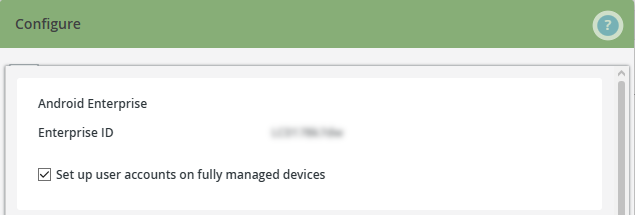
- To do so open the Cortado Administration Portal under Administration→ Settings→ Android Enterprise→ Configure.
- The Set up user accounts on fully managed devices checkbox is enabled by default. Please keep this setting.
Note! If you want users of fully managed devices (COBO) to manage their apps themselves, uncheck the checkbox. You can find more information on this here.
Note! To configure a Fairphone, the checkmark must also be removed. You can find more information on this in our help article How to manage a Fairphone with Cortado MDM.
For more information on configuring Android Enterprise, click here:
NEW ADMINISTRATION PORTAL: Configure Android Enterprise
The new administration portal is currently in the beta phase. You are welcome to send us your feedback on the new portal using the corresponding button (at the bottom left of the new administration portal).
Set up Managed Google Play accounts for your Android devices in the Cortado Administration Portal. This allows you to take advantage of all the benefits of Android Enterprise.
Configuring Managed Google Play accounts is simple and quick. This allows you to manage your users' devices and their apps in no time at all.
INHALTSVERZEICHNIS
Registering Your Business with Google
- Open Settings (left arrow in the image) and then go to the Android Enterprise tab.
- There, click Enroll now (right arrow in the image).
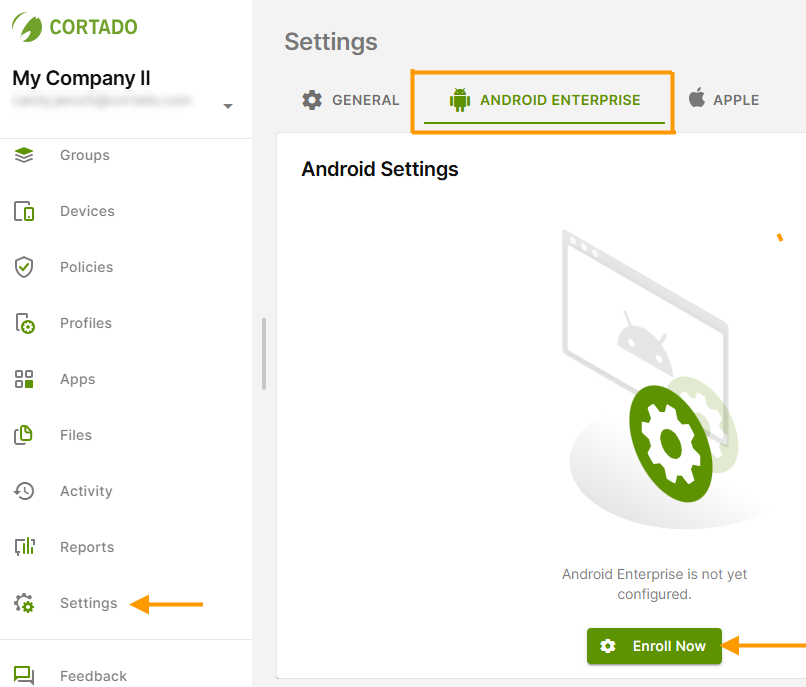
- Then click on Start sign up.
Log in to Google in the next window. Use either:
- an existing admin account for Google Workspace,
- a business e-mail address that does not yet have a Google Workspace account,
- or any Gmail address.
1. Log in with an existing admin account for Google Workspace
- Enter your password and then click on Allow.
Registration is now complete. Your Workspace account has been successfully linked to Cortado. Continue as described below.
2. Sign in with a business email address that does not yet have a Google Workspace account
If you do not yet have a Google Workspace account, you can register your company directly now.
- Use an e-mail address with your company domain (e.g.: vorname.nachname@ihrunternehmen.de) to register.
- You will then receive a verification email from Google. Confirm your e-mail address by clicking on the link in the e-mail.
- Enter your contact details and confirm your entry.
- Add further subscriptions to your management account. Android Enterprise for Cortado is already activated.
- Set your password for the Google Admin Console and confirm the entry.
- Confirm the administration of Android Enterprise with Cortado and create your Google Admin account.
Registration is now complete. Continue as described below.
3. Log in with any Gmail account
- Select the option on the right and click on Sign up.
- You will now be redirected to the Google Play registration page.
- In the next window, click on Get started.
- You will need a Google account for the registration simply create a new account if you don’t have one already.
- Now use your Google account to sign in.
- Now enter your company name and then click on Next.
- Now provide the names and contact details of the data protection officer and the EU representative in your company.
- Then click on Complete Registration.
The registration is now complete.
Configure Google settings to the Administration Portal
- Open the Settings (left arrow in illus.) and select the Android Enterprise tab (middle arrow in illus.).
- Under Android Enterprise, click Manage (right arrow in illus.).
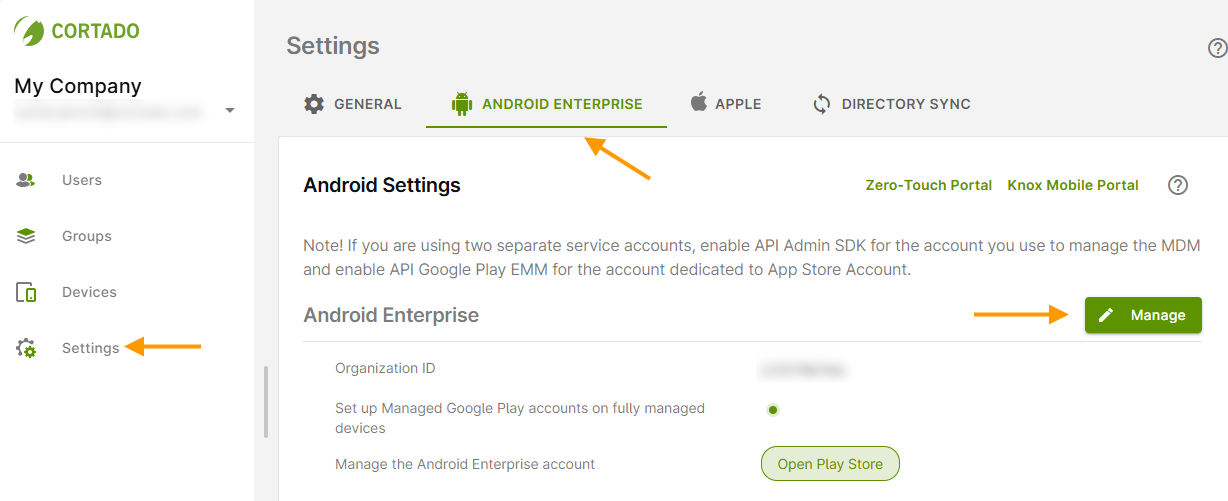
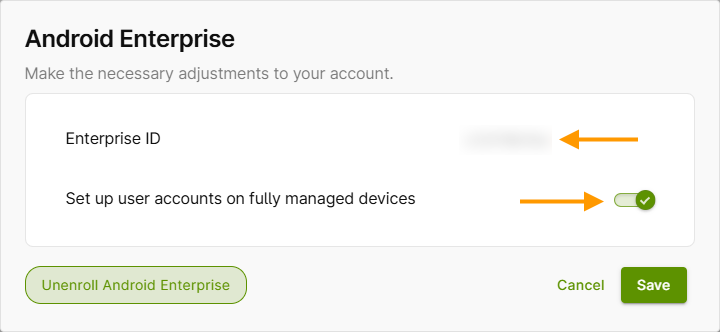
Here you will find your Enterprise ID (upper arrow in illus.).
You will also find the checkbox Set up user accounts on fully managed devices (lower arrow in illus.). This is enabled by default. Keep this setting.
Note! If you want users of fully managed devices (COBO) to manage their own apps, uncheck the box. For more information, see our help article: How to let users of fully-managed Android devices use their own Google accounts.
Note! The check mark must also be removed to configure a Murena Fairphone. For more information, see our help article: How to manage a Murena Fairphone with Cortado MDM.
For more information on configuring Android Enterprise, click here: